
Night warnings, the shutter and the Clock
Know how to react to outdoor darkening and the window figure, find the shutter control, and understand the creator-reported night-skip Clock.
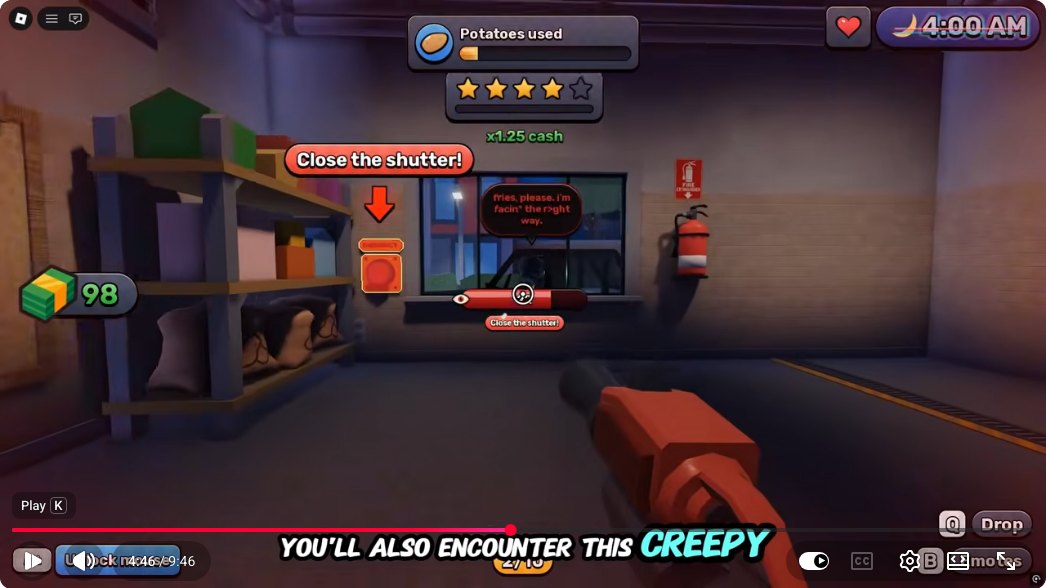
When your screen darkens outdoors at night, stop lingering outside and head back to the shop as a precaution. If the dark figure reaches the service window, use the highlighted control immediately to its left and follow “Close the shutter!”. Zac Worthy’s walkthrough reports these warnings and an 8:00 p.m. night start; follow the current game prompts if your run differs.
React to the warning in front of you
These precautions come from Zac Worthy’s narration and the recorded shutter scene. We have not performed an in-game survival test.
Watch the game clock
The narrator reports night beginning at 8:00 p.m. This refers to the game’s displayed clock, not your local time or a fixed real-time countdown.
Stop lingering outside when the screen darkens
Zac describes a dark filter covering the screen outside and warns that staying out too long brings an anomaly. Stop outdoor searching and head back to the shop as a precaution; the recording does not establish that indoors is always safe.
Find the highlighted shutter control
In the recorded window encounter, an arrow points to the red/orange control immediately left of the service window and the game displays “Close the shutter!”. Use that control and follow the visible interaction prompt promptly. No universal keyboard shortcut or safe waiting period is established.
What the reported Clock changes
Zac reports the shop opening at 8:00 a.m. and describes a Clock bought there that skips nighttime to morning. The same narration says a new day brings a free upgrade choice; the recorded morning screen is labeled “NEW PERK EVERY MORNING!”. These remain source-specific reports, rather than a promise for every version.
If your current shop offers the Clock, check its listed cost and description before buying, then follow the owned item’s use prompt. The collected passage does not establish a verified price or activation key. A reported time skip does not prove that the item rescues you from an encounter already in progress. If you cannot obtain it, continue using the night precautions above.
The narrator also warns about incoming cars when crossing the road to the shop. Keep the current objective visible during the change back to daytime.
The night warning is official
Sell Fries is listed in Roblox's Survival genre, despite its ordinary cooking loop. The official description pairs potato collection, cooking, serving and kitchen upgrades with a warning about the night.
The official cover shows a bright restaurant and a blue vehicle outside the window with a dark red-eyed driver. This is promotional artwork illustrating the premise; it does not establish an enemy’s name, attack timing or a particular defense rule.
Prepare without guessing a survival rule
Learn the daytime stations
Be able to identify the pile, peeling station, cooking station and serving point before the situation changes. The beginner guide supplies the complete service procedure.
Notice the current objective
Watch the game's displayed prompt when the shift or scene changes. A cooking order and a survival objective need different actions. This is a preparation method; no universal night timer is claimed.
Use a walkthrough for the scene you actually see
The public AnyaRoblox and DOREMII videos are explicitly titled walkthroughs with an ending. Compare your current scene with their recording before following it. These are creator videos, not official game instructions.
Public walkthroughs to compare
27:09; discovered October 10, 2026. A creator walkthrough to compare with your current scene; the exact ending procedure is not verified for this guide.
8:44; discovered October 10, 2026. A creator walkthrough to compare with your current scene; the exact ending procedure is not verified for this guide.
What this guide does not establish
The currently collected sources do not establish a full anomaly list, exact spawn schedule, a safe-window rule or a guaranteed ending route. Words in the game's discovery tags, such as Key or Escape, do not establish those mechanics either.
The shutter and outdoor advice above retain their creator and recording context. This page does not label the ending solved, supply a complete anomaly catalogue or imply that we have personally survived the game.
Continue your next task
- Official: Sell Fries — official Roblox experience
- Official artwork: Sell Fries promotional artwork
- Walkthrough link: AnyaRoblox — full walkthrough + ending
- Walkthrough link: DOREMII — walkthrough + ending
- Creator report and inspected recording: Zac Worthy — kitchen upgrades, night and Clock
Source labels describe the evidence used; they do not claim an in-game site test.